


![[ Buat yg tersayang ] : ira_syomel](http://img165.imageshack.us/img165/6895/xxxwj9.jpg)
Assalamualaikum WBH dan salam sejahtera. Tiada keistimewaan pada diri aku mahupun tulisan yang aku nukilkan. Semuanya tercoret dalam jurnal peribadi ini menurut rasa hati dan apa yang aku tahu berteraskan sumber...[ selanjutnya ]
Coolmivec@Me
laman Kroni

- [ coo£mivec friendster ]
- [ coo£mivec myspace ]
- [ myladyiera ]
- [ mybest-dad ]
- [ myfather-in-law ]
- [ sritakzim-pae ]
- [ mimie-aryanie ]
- [ hadie-hanie ]
- [ afdlinshauki ]
- [ rtm-bongkar ]
- [ coolcrypto_romero ]
- [ eicad keramat ]
- [ ojadanarin ]
- [ mykidz blogger ]
- [ syurgawjr blog ]
- [ saifulnang ]
- [ nizamzakaria ]
Download @ Muat Turun
News & Information
- BBC News
- CNN.com
- The Star
- Bernama
- News Straits Times
- Malaysia Kini latest update!
- Utusan Malaysia
- Harian Metro
- Berita Harian
Designs, Graphics & Arts

Cartoon Site
Ecards Selection

Books, Novels, Magazines
Health Site
Archives
- 01.10.1990
- 01.11.1990
- 09.01.1990
- 09.09.1990
- 10.02.1990
- 10.05.1990
- 10.01.1991
- 10.02.1991
- 10.03.1991
- 10.04.1991
- 10.05.1991
- 10.06.1991
- 10.07.1991
- 10.09.1991
- 10.10.1991
- 10.11.1991
- 10.12.1991
- 10.13.1991
- 01.01.1994
- 02.01.2002
- 02.02.2002
- 02.03.2002
- 05.31.2004
- 06.01.2004
- 06.02.2004
- 06.03.2004
- 02.15.2005
- 07.18.2005
- 10.01.2005
- 10.02.2005
- 10.03.2005
- 12.16.2005
- 12.19.2005
- 01.15.2006
- 01.16.2006
- 01.22.2006
- 01.28.2006
- 01.29.2006
- 02.04.2006
- 02.05.2006
- 02.06.2006
- 02.07.2006
- 02.13.2006
- 02.14.2006
- 02.21.2006
- 02.24.2006
- 03.03.2006
- 03.11.2006
- 03.19.2006
- 03.27.2006
- 04.10.2006
- 04.25.2006
- 04.28.2006
- 05.12.2006
- 05.24.2006
- 06.11.2006
- 06.30.2006
- 07.18.2006
- 07.24.2006
- 07.26.2006
- 08.24.2006
- 08.26.2006
- 08.31.2006
- 09.06.2006
- 09.08.2006
- 09.15.2006
- 09.18.2006
- 10.03.2006
- 10.12.2006
- 10.13.2006
- 12.18.2006
- 02.06.2007
- 02.07.2007
- 02.13.2007
- 02.28.2007
- 03.06.2007
- 03.08.2007
- 03.09.2007
- 03.16.2007
- 03.20.2007
- 04.18.2007
- 04.23.2007
- 08.26.2007
- 09.18.2007
- 04.02.2008
- 04.10.2008
- 06.03.2008
- 06.04.2008
- 09.05.2008
Who's ONLINE
Ketika ini ada pelawat online
Selamat melayari laman web ini!
iklan@Me

Photo Sharing
[ coolmivec + lady iera ]
[ Linda's Wed ]
[ Lily's Wed ]
[ Zakila's Wed ][ Azam's Wed ]
[ Kwn SMJS ][ Aktiviti Rehat ]
[ Kembara ][ Kemuncak ]
[ Berbuka Pose ][ Jeram Toi ]
Check Saman Trafik
Sembang²
Entertainment Stuff

- Flash Game 247 best!
- Info tv series (US)
- Paper Online
- PeekVideo
- CinemaOnline best!
- TGV
- GSC
- Sungguh.Com
- Forum Cari
- Akademi Fantasia official
- AF extra
- AF.Net
- adibah-noor
- Siti Nurhaliza
- malaysiaview.tv
- artismelayu
My Favourite Community
- Virtualfriends best!
- eKawan
- myRakan
- Friendster best!
- Hi5
- mySpace
- SMS.ac
Comics & Manga

The Music Site
Photography Stuff
Upload Website
recent updates
- [ Tips ] : How to password protect a shared folder...
- [ Tips ] : Run commands for Windows XPThe followin...
- [ Umum ] : Carian LaguRamai tahu bahawa Google ada...
- [ Umum ]: HIKMAT, RAHSIA DAN KHASIAT SURAH-SURAH &...
- [ Umum ]: Mari Boikot Barangan Keluaran BelandaLis...
- [ Crocs - Color Your World : Iklan kasut aku kejap...
- [ 50 Tahun Kemerdekaan Malaysia ] Penempatan teraw...
- [ Umum: Amaran Mengenai Swiss Cash Atau Swiss Mutu...
- [ Movie : Jangan Pandang Belakang ]Bebaru nie aku ...
Contact @ message me

[
coolcryto_romero ]
nak tukar link, pendapat, kritikan, sokongan etc. sila email saya ke:
hai@cmivec.com
![Click here to join [ 5st1998 Group ] |Group bebudak SMJS|](http://us.i1.yimg.com/us.yimg.com/i/yg/img/i/us/ui/join.gif)
Join 5st1998
credits


 |
||
"Adakala Allah menguji kita dengan pelbagai dugaan, untuk menjadikan seseorang insan tersebut merasa apa erti merendah diri, dan sentiasa mengenangkan cinta dan keampunanNya yang akan kekal abadi, tidak seperti manusia." |
||
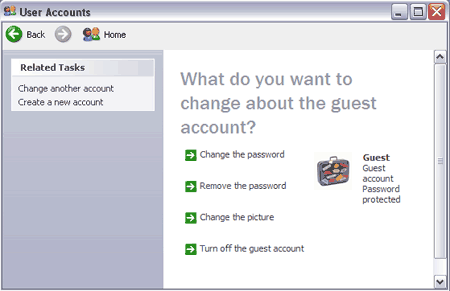
| [ Tips ] : How to password protect a shared folder If your looking to password protect a shared folder on your network, you've probably noticed that Windows XP doesn't have any built in features allowing you to lock access to a folder via a password like previous Windows releases did. This means that anyone using the same workgroup or domain can access the files within your shared folder. The good news is that there is a work around that seems to do the trick and simply involves creating a password for the guest account. Since shared folders are accessed on the network using the guest account, once the password for the guest account is set, a user in your workgroup or network domain must supply a valid username and password for the guest account to access the shared folder and contents within. Password protecting a shared network folder:
Labels: Tips Sifoo |

| [ Tips ] : Run commands for Windows XP The following is a run command shortcut list for Windows XP. Run commands allow a user to quickly access a variety or Windows XP tools and applications directly via the Start -> Run interface. For quick reference, the application name is on the left and the command you would type in the run window is shown to the right in bold. * Accessibility: ACCESS.CPL * Add-Remove Programs: APPWIZ.CPL * Automatic Updates: WUAUCPL.CPL * Calculator: CALC * Character Map (ascii): CHARMAP * Command Prompt: CMD * Component Services: DCOMCNFG * Computer Management: COMPMGMT.MSC * Control Panel: CONTROL.EXE * Date and Time: TIMEDATE.CPL * Encryption: SYSKEY * Device Manager: DEVMGMT.MSC * Direct X Diagnostics: DXDIAG * Disk Cleanup: CLEANMGR * Disk Defragment: DFRG.MSC * Display: DESK.CPL * Display Properties: DESK.CPL * Group Policy Editor (XP PRO): GPEDIT.MSC * Internet Properties: INETCPL.CPL * Local Running Services: SERVICES.MSC * Microsoft Chat: WINCHAT * Mouse Properties: MAIN.CPL * Multimedia and Sounds: MMSYS.CPL * Network Connections: NCPA.CPL * Network Setup Wizard: NETSETUP.CPL * Notepad: NOTEPAD * Outlook Express: MSIMN.EXE * Performance Monitor: PERFMON.MSC * Power Management Settings: POWERCFG.CPL * Regional Settings: INTL.CPL * Registry Editor: REGEDIT * Remote Desktop: MSTSC * Removable Storage Manager: NTMSMGR.MSC * Scheduled Tasks: CONTROL SCHEDTASKS * Security Center Settings: WSCUI.CPL * Shared Folders Management: FSMGMT.MSC * System Configuration Utility: MSCONFIG * System Properties: SYSDM.CPL * Task Management: TASKMGR * Telephone and Modem Options: TELEPHON.CPL * Windows User Account Manager: NUSRMGR.CPL * Windows Utility Manager (narrator): UTILMAN * Windows Updates: WUPDMGR * WordPad: WRITE Additional Windows run commands exist, but these are the ones I feel are important to keep on hand. Labels: Tips Sifoo |
|
|
|